
At Sagicc, we continue to evolve with you, and we understand that every interaction with your customers is an opportunity to differentiate, build loyalty, and generate value. That’s why we’re integrating improvements that positively impact your operations.
Today, we’re introducing new updates that not only address specific needs but are also ideas born directly from our own users.
New WhatsApp Templates “Carousel”
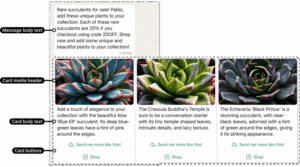
You can now create carousel-type templates directly from Sagicc and submit them for approval to Meta. These templates allow you to showcase multiple options in a single message: images, buttons, and custom text. This new marketing template format, fully supported by our native integration with the WhatsApp Business API, lets you present content in a much more engaging, dynamic, and visual way within your conversations. The carousel transforms a simple message into a visual experience that stimulates interaction. It’s ideal for showcasing products, services, promotions, or support alternatives in one dynamic view.
Instead of limiting yourself to linear messages, you can now present a visual menu of options, perfect for:
-
Showing multiple products or services in a single view
-
Offering category-based personalized promotions
-
Guiding users step by step through complex flows, such as technical support or appointment scheduling
-
Presenting different contact or service areas within your company
This is especially useful for sales, marketing, and support teams that want to elevate engagement quality without overwhelming users with multiple consecutive messages.
Manual Customer Creation Without ID
We’ve enabled a new option in company settings that allows you to activate or deactivate the ability to create customers manually without requiring document type and number. This is useful because every operation has its own timing and priorities.
Why is this important?
Customer registration needs are not the same across all industries or at all stages of the service lifecycle. For example:
-
In operations where speed of contact is critical—such as initial support from digital channels—allowing customer creation without an ID prevents losing follow-up opportunities.
-
In more regulated environments that require precise traceability, you can keep mandatory data collection from the first contact.
This flexibility allows you to adapt registration based on context. You can prioritize user experience early on and complete the data later when the relationship is more established or the user is ready to provide the information.
Enable/Disable Web Chat Transcript Sending
You can now enable or hide the option that allows customers to request a conversation transcript directly from the chat. Providing a copy of the chat can increase trust and transparency in service, especially in processes where important steps, instructions, or agreements are shared. At the same time, you can disable this option if the nature of the service requires greater confidentiality.
When should you enable it?
-
In processes where step-by-step instructions are provided, sharing the transcript gives users a helpful reference, reduces repeated inquiries, and improves service perception.
-
In sectors such as technical support, financial services, education, or healthcare, having a copy of the exchange can be crucial for the customer.
When should you disable it?
-
In services where confidentiality and sensitive data protection are priorities, you can disable this option to maintain greater control over shared information.
These new features not only optimize your management, but also give you more tools to create memorable, agile, and customer-centric experiences.
Remember, many of these ideas were born from suggestions made by our users. If you have proposals, we’d love to hear from you!
Stay tuned to our updates—each new release brings tools that can make a real difference in your customer service and communication strategy.